Get invited to eat and post at restaurants
Restaurants pick from our 300,000+ food-creator network. Each invitation shows what's on offer. A free meal, or a meal plus pay. You choose the ones you want.
Join as Creator
How does CreatoRain work for creators?
CreatoRain invites you on behalf of a restaurant, and the invitation says what's on offer: a meal, or a meal plus pay. Your invitation email carries your own link. Open it any time to pick a location, a date and a time from the ones open to you, and to reschedule if plans change. You visit, the restaurant covers your meal, and you post on your own account and submit the link. On a paid collaboration, you then request payment from the same page.
Every step happens in the CreatoRain creator portal, the page your link opens. Joining is free.

Accept an invitation
Each invitation shows what's on offer. Accept the ones you want.
Book and visit
Pick a location, a date and a time. You get a reminder before you go.
Post and get paid
Post on your own account and submit the link. On a paid visit, request payment on the same page.
What you can count on
Free to join
You don't pay to sign up, book a visit or change it.
The restaurant pays for your meal
Every visit includes your meal. You post about what you actually ate.
You see the pay before you accept
Some visits pay on top of the meal. The amount is in the invitation.
You sign a simple agreement
Your pay is the amount your agreement sets out.
Get paid by Zelle, Venmo, Cash App or PayPal
Submit your video, then request payment from your link.
Reschedule or cancel with no penalty
Change your visit from your link. The restaurant gets its table back.
Step by step, in the creator portal
This is what your link opens. The restaurants, places and amounts in these pictures are sample data.
See your collaborations
A restaurant invites you by email, and the email carries your link. It opens one list of your collaborations, each with what it offers and what's left to do.
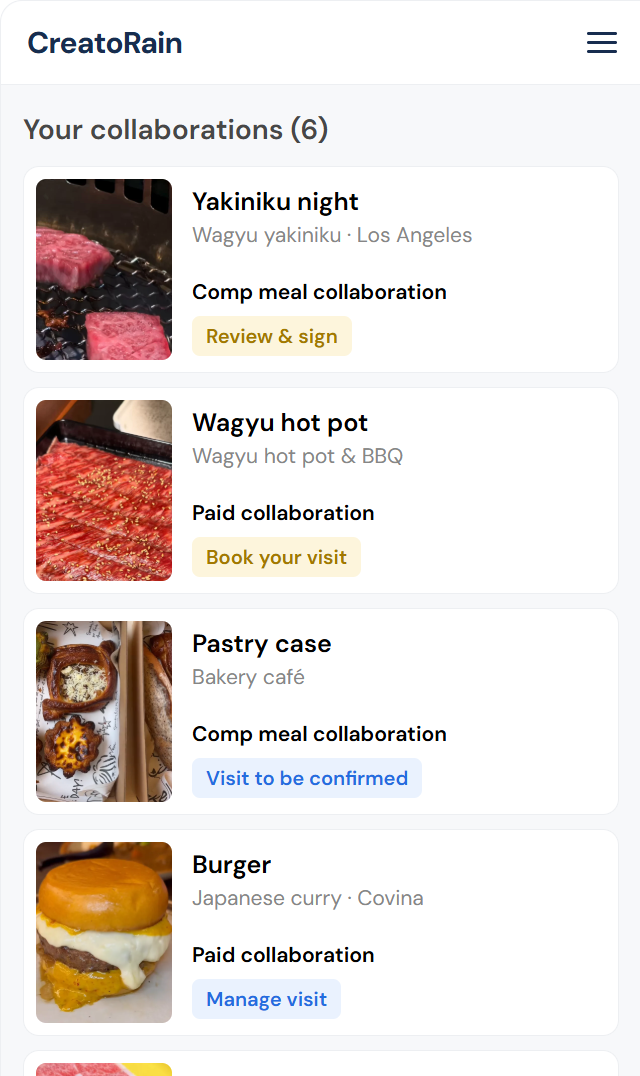
Every collaboration sits in one list. Each card shows the restaurant, the deal and your next step. The picture shows sample data. Choose a location
One collaboration can cover several locations of the same restaurant. You choose the one that suits you.
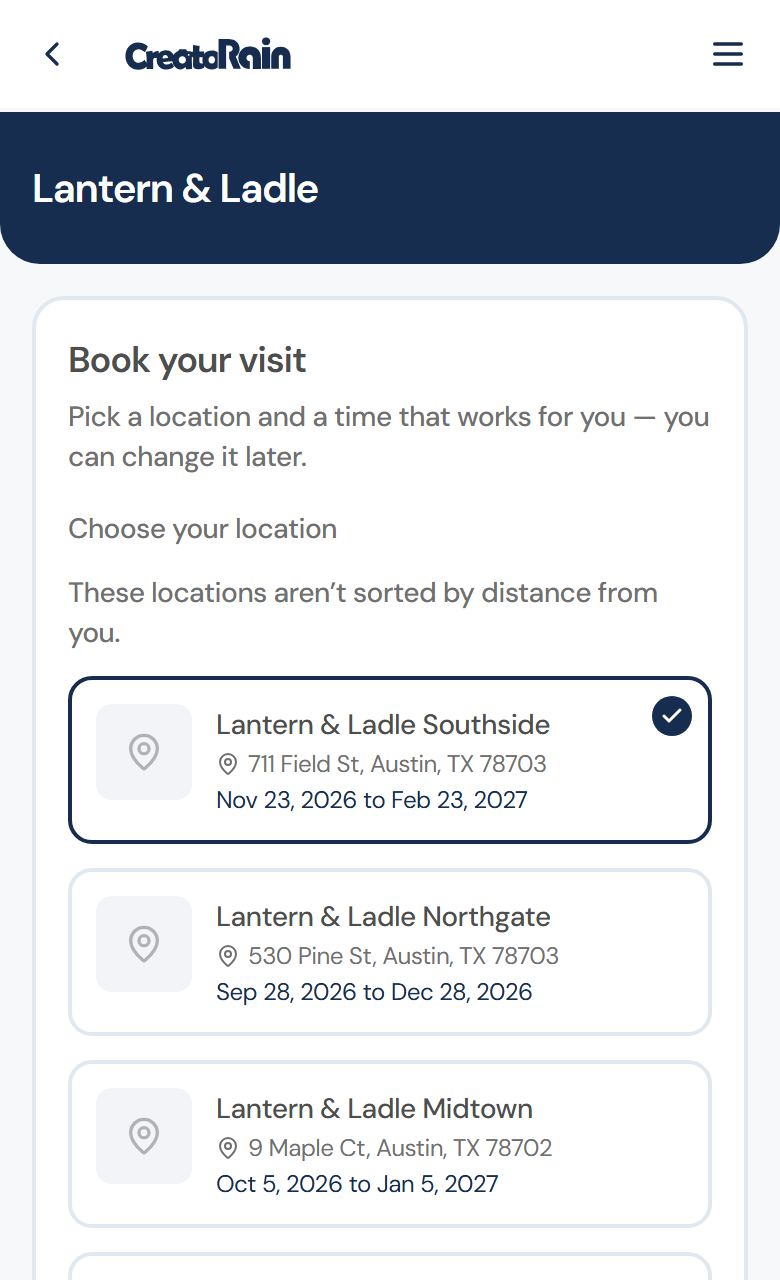
Book your visit, with each location's address and the dates it takes bookings. Pick a date and a time
Choose a day the location takes visits, then one of the times it offers that day.
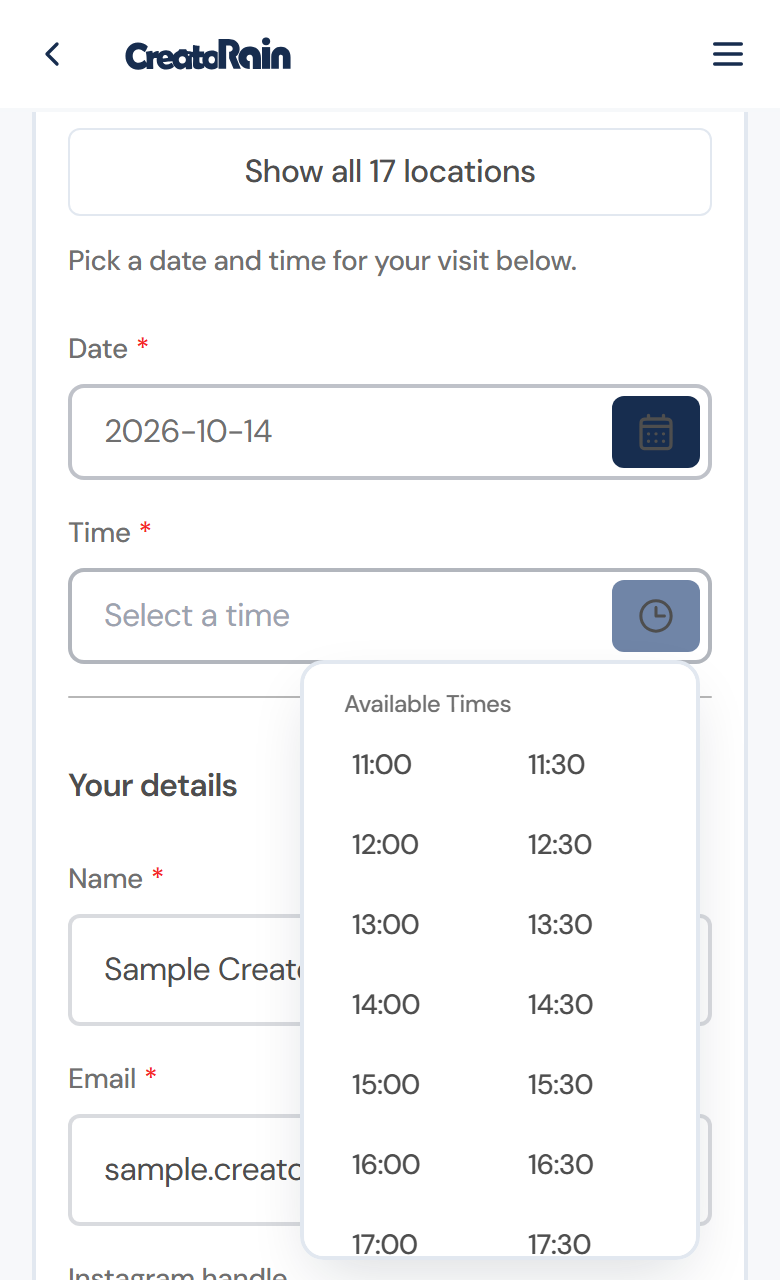
A date picked, and that day's available times open. Get confirmed and reminded
Once the booking is confirmed, you get a reminder before your visit and another the day before. If plans change, you reschedule or cancel here.
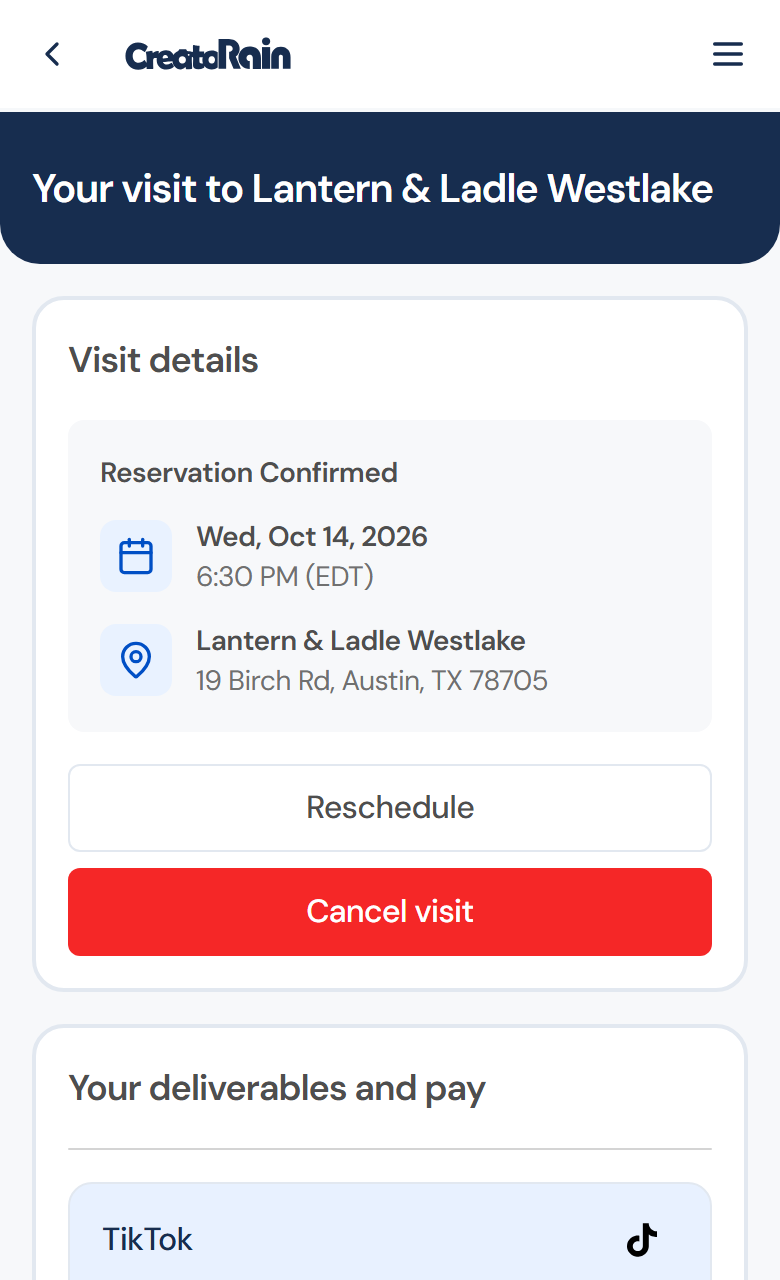
A confirmed sample visit, with Reschedule and Cancel visit under it. Post, then submit the link
After your visit, post on your own account with what the collaboration asks for, then add the link and press Submit.
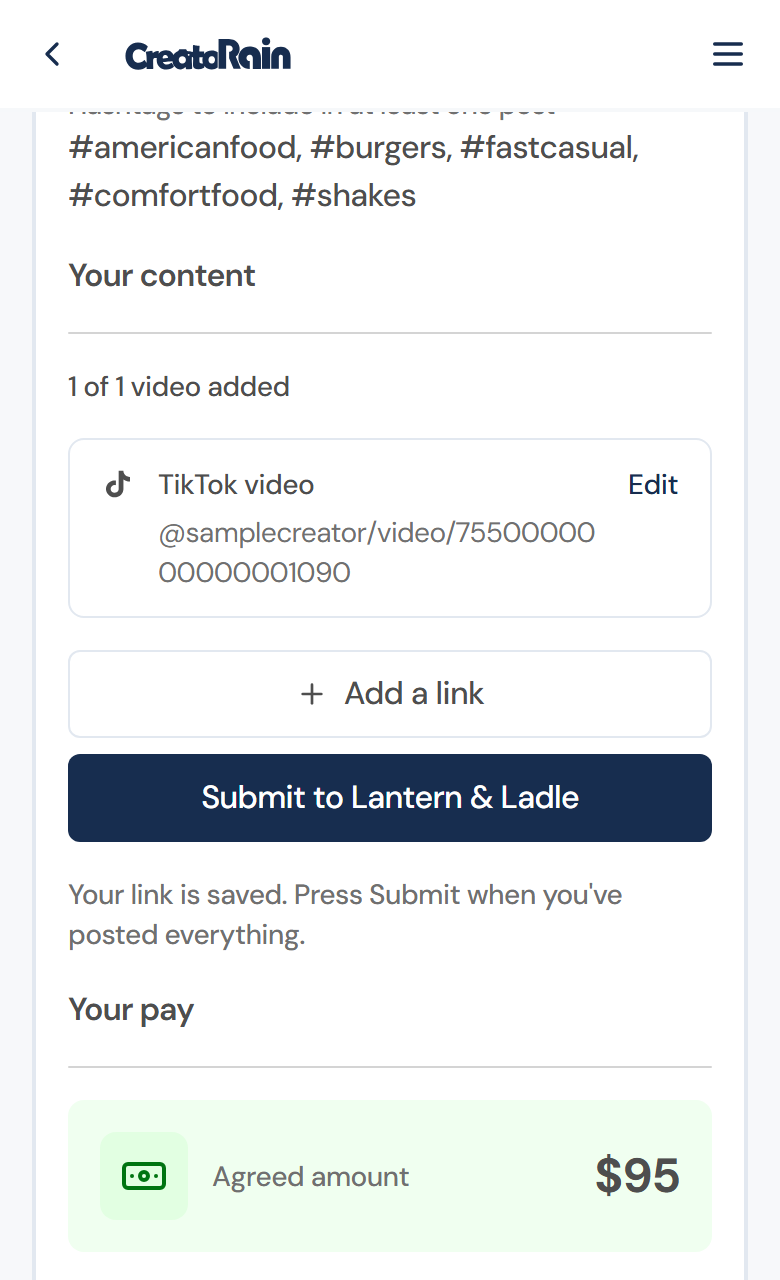
The hashtags to include, then one TikTok link added and ready to submit. Request payment
On a paid collaboration, once your video is submitted and your agreement is signed, you request payment from the same page and are paid as your signed agreement sets out.
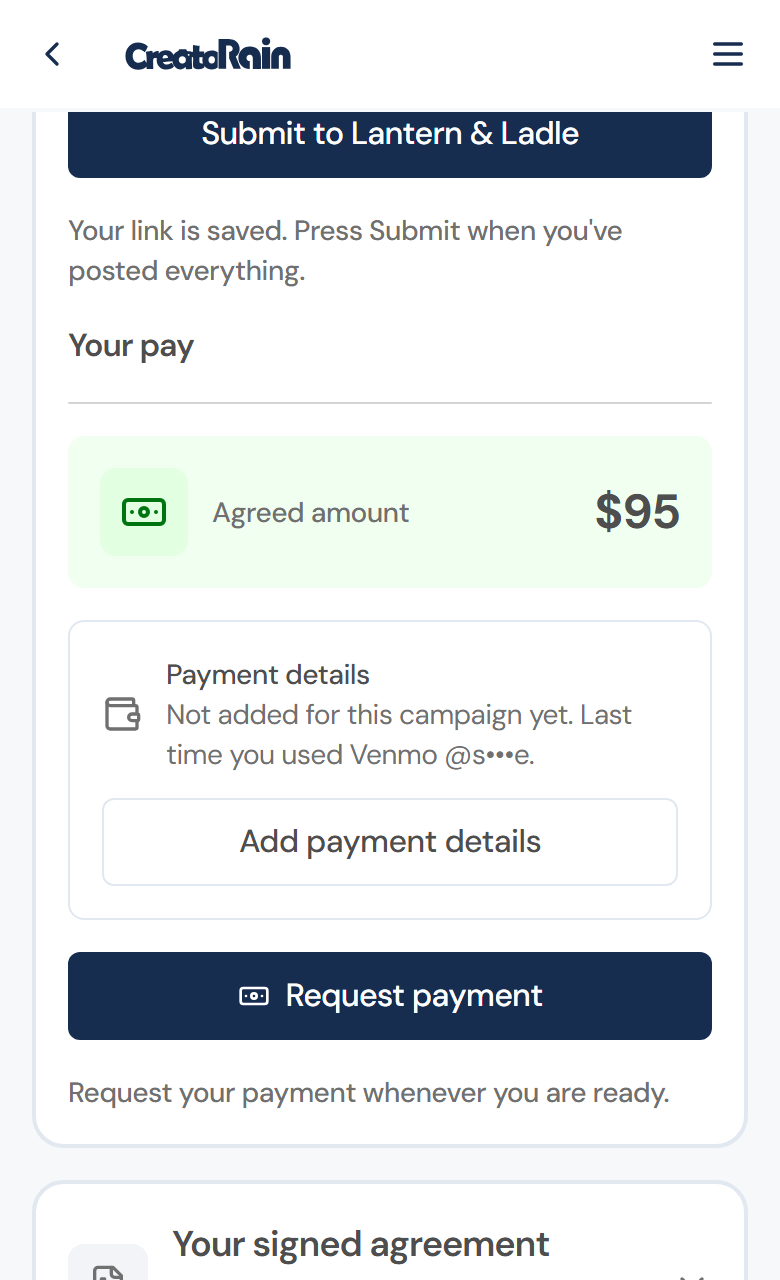
The agreed amount, your payment details and the Request payment button.


Frequently asked questions
Is CreatoRain free for creators?
Yes. Joining CreatoRain and accepting an invitation cost you nothing: you don't pay to sign up, to book a visit or to change it. On a paid collaboration, what you're paid is the amount in your signed agreement.
Do I get paid on CreatoRain?
Every CreatoRain visit includes your meal, and some locations and campaigns also pay on top of it. When one does, the amount is in the invitation before you accept. Depending on the location, the payment comes from CreatoRain on the restaurant's behalf or from the restaurant itself. Once your video is submitted and your agreement is signed, you request payment from the campaign page, choose how you're paid (Zelle, Venmo, Cash App or PayPal) and are paid as your agreement sets out.
Can I book a CreatoRain visit any time?
You book whenever it suits you, from your CreatoRain link: you pick the location, the date and the time yourself. What you can pick is limited to the locations open to you and the hours each one takes visits. Some restaurants don't take visits at their busiest times, such as weekend evenings, and a location stops taking bookings once it has the videos it needs.
What if I need to reschedule a CreatoRain visit?
Open your CreatoRain link and press Reschedule on your visit to pick a new date and time, or Cancel visit if you can't make it. There are no fees or penalties. Every reminder email also says where to change the booking, so the restaurant can free the table.
Where is my CreatoRain link?
It's in your CreatoRain invitation email. The link is your own: it signs you in without a password and opens your collaborations, so keep the email. If an old link stops working, a newer invitation has replaced it, so use the link in the newest email.
What do I have to post for CreatoRain?
Each CreatoRain collaboration lists what to post on its campaign page: the platform, how many videos, and any hashtags to include. You post on your own account about what you actually ate, then add the link on the same page and press Submit.
Who pays for the meal on a CreatoRain visit?
The restaurant does. Your meal is part of every CreatoRain visit, whether or not the collaboration also pays you, and the restaurant covers it.
Ready for your first invitation?
Create your profile, so CreatoRain can invite you when a restaurant campaign fits.